
Team Admin Role
Team Admin-level access is designed for department leads who need to manage team-level settings without granting organization-wide admin access.
Team Admin vs Account Admin
Account Admin
Manages organization-wide settings, including billing and anything in Organization Settings.
Can manage users and permissions across the organization.
Team Admin
Manages settings for one or more specific teams.
Does not have organization-wide control.
Works best when paired with the right View Access configuration.
Understanding Permissions
Fathom permissions are made up of two independent settings:
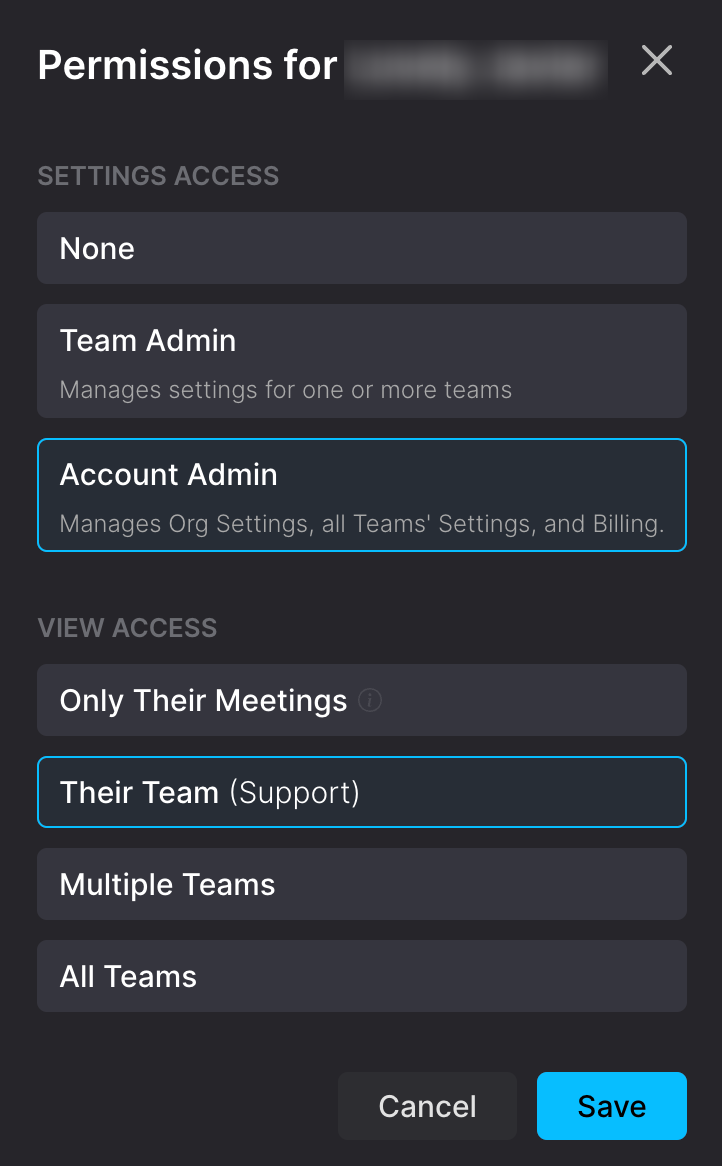
Settings Access: what settings someone can manage (Account Admin vs Team Admin vs Standard).
View Access: which teams’ calls and folders someone can see (Only their meetings vs one team vs multiple teams vs all teams).
Because these are separate, someone can be a Team Admin and still not see team calls if View Access is restricted.
Assigning a Team Admin
Sign in as an Account Admin.
Go to Settings → Users and find the person.
Click the gear icon.
Under Settings Access, choose Team Admin.
Select which team(s) that person should manage.
Review View Access to ensure it matches what you want that person to see.
Click Save.
What a Team Admin Can Do
Depending on your account and how permissions are configured, Team Admins can typically:
Manage team-level settings for the teams they are assigned to manage.
Manage sharing and visibility for calls when they have the right access to that call.
Create and edit Meeting Types for teams they manage.
Create and edit AI scorecards for relevant meeting types.
Billing Access
Billing (invoices, payment methods, seat counts, subscription changes) requires Account Admin access. If you or a teammate needs billing access, feel free to reach out to your Account Admin!