
In-meeting chat setting (Zoom)
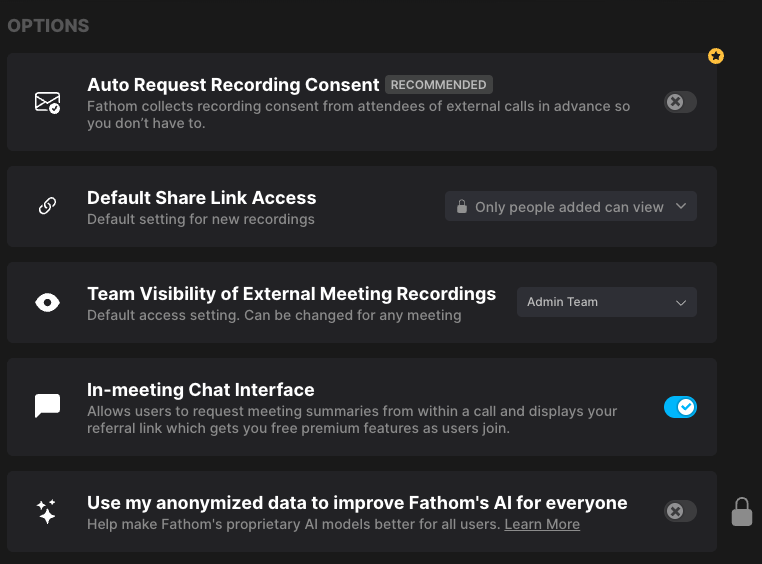
The In-meeting chat setting lets Fathom send and respond to messages in the Zoom meeting chat during a meeting.
It’s mainly used to:
Inform attendees that Fathom is taking notes & summarizing
Let the host remove Fathom from the meeting via chat (leave)
Let attendees request a copy of the meeting summary via chat (summary)
Where to find the setting
Go to fathom.video/customize
Scroll to Options
Toggle on/off In-meeting chat interface
What messages get posted
1) Bot owner message
When the bot owner joins the meeting, they receive a message in Zoom chat:
Fathom will take notes and summarize this meeting. You can change your Fathom settings by going to fathom.video/customize. Reply 'leave' to remove Fathom from the meeting.
2) Participant message
Other meeting participants will receive a version of:
Fathom will take notes and summarize the meeting
Exact wording can vary based on:
The host’s auto-share setting (whether attendees will automatically receive the summary)
Whether the participant is already a Fathom user
Supported chat commands
leave (host-only)
If the bot owner types leave in the Zoom meeting chat:
Fathom stops recording
Fathom leaves the meeting
summary (any participant)
If any participant types summary in the Zoom meeting chat:
Fathom acknowledges the request
The participant receives a copy of the meeting summary after the call
Requirements/limitations
Zoom-only feature.
Enhanced Recording must be disabled for meetings hosted by the bot owner; otherwise, the in-meeting chat interface won’t work.
The feature may be feature-flagged (not all accounts will have the setting available).
Related: Zoom chat capture vs. chat interface
This setting is different from capturing Zoom chat into the transcript.
What gets captured into the transcript (when available)
Messages sent to Everyone in the Zoom chat
Messages sent directly to the Fathom bot
What doesn’t get captured
Private 1:1 participant messages
Messages from Zoom clients that don’t expose chat content to the bot
Troubleshooting (common issues)
I don’t see the “In-meeting chat interface” setting
This feature is Zoom-only.
If you’re on Zoom and still don’t see it, it may not be available on your account yet.
Fathom’s chat message isn’t showing in my Zoom meeting
Confirm you’re in a Zoom meeting (this won’t work in Google Meet or Microsoft Teams).
Double-check that In-meeting chat interface is enabled at fathom.video/customize → Options.
If you’re the host, make sure Enhanced Recording is disabled — if it’s enabled, the chat interface may not function.
The “leave” command didn’t work
The leave command only works for the bot owner (the person who connected Fathom / whose settings control the bot).
The “summary” command didn’t work
Ask the participant to type summary in the meeting chat (exact word).
The summary is sent after the meeting ends, not immediately.
Questions? Feel free to email us at help@fathom.video!